
The Ambition-Target-Lifecycle Method
A portable, teachable framework for turning fuzzy intentions into finished work. The core idea is simple: separate the outcome from the action, and give each its own home.
Draw your ambition map
If you have more than one thing on your mind and don’t know where to start, draw a map of how they fit together — like this:
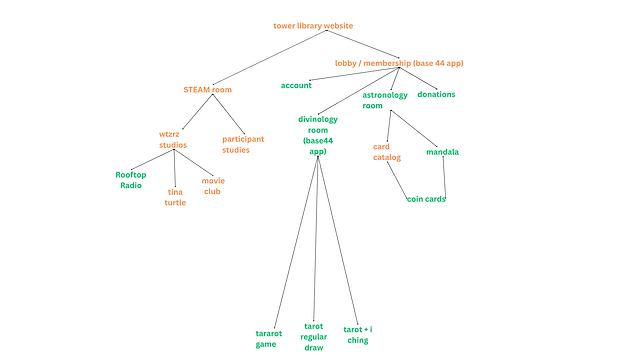
List out your ambitions using text and connect them together using lines. The app will read your drawing and add your ambitions to your workspace for you. Then it’s up to you to create the targets.
Why separating outcome from action matters
Most to-do lists mix two very different things: the result you want (an outcome) and the steps to get there (actions). When they're tangled together, you lose sight of why you're doing anything. You check off tasks but never feel done, or you chase a vague goal with no next step in sight.
The Ambition-Target method pulls them apart. An Ambition names the outcome — what "done" looks like. A Target names one concrete action that moves you toward it. The Lifecycle tracks where each target stands, so the work flows instead of stalling. This separation keeps your judgment in charge: you decide what matters, then decide what to do about it, one decision at a time.
Define your targets
A Target is a single, doable action that serves an Ambition. Each target carries a priority and a status, and can be tagged with Labels that answer the six questions — who, what, when, where, why, and how. Targets answer how can you do it? They are small enough to finish in a sitting and specific enough that you know when they're done.
Labels remember what matters
A Target represents a change you're going to make. Labels help you remember everything about it. Each label answers one of the six questions, so you can find related targets by what they share — the same person, the same tool, the same reason — without re-reading every card.
Who
Who is getting the change? Make labels to remember the "whos" you have cooking — the people, teams, or audiences each target serves.
What
What actually changes when the work is done? Label the concrete result so you can tell similar-looking targets apart.
When
Soon? Not soon? Done already? When labels keep your timeline honest without forcing a hard due date on everything.
Where
Where does this change take place? For digital projects, this is your toolset: Webflow, Base44, Notion, Github, Google Sheets, Canva.
Why
Why are we making this change? Boil it down to two or three whys. Examples: directly drives revenue, indirectly drives revenue, supports ease of use, supports hygiene. If you can’t think of a single one, it probably isn’t worth listing.
How
How does it get done? Label the tools at your disposal for solving the problem so you can group targets by approach.
Keep them moving
The Lifecycle is the board your targets travel across: from wishlist to waiting, ready, today, handoff, and finally complete. It answers where is it? — not as a judgment, but as a map. Nothing is lost, nothing is rushed; each target finds its moment. Day themes layer a traditional weekday focus on top, giving each day a natural focus so your week has rhythm without rigidity.
From fuzzy idea to next move, in the workspace
1. Name an Ambition
Open the workspace and add an Ambition. State it as an outcome — "Launch a homestead services business," not "research LLCs." Mark its timeframe (past, present, or future) so your timeline stays honest.
2. Add Targets under it
Inside an Ambition, add Targets: concrete actions you can finish in a sitting. Each Target belongs to one Ambition, so you always know why you're doing it.
3. Label with the six questions
Tag each Target with Who, What, When, Where, Why, and How. You answer them yourself — the app keeps your answers visible, it never guesses.
4. Move Targets across the Lifecycle
Move a Target from Wishlist → Waiting → Ready → Today → Handoff → Complete. The board shows where everything is and what needs your attention next.
5. Give your week a rhythm (optional)
Assign Ambitions and Targets to weekday Day themes so each day has a natural focus without rigidity.
6. Ask the Sous Chef when you're stuck
Open the Sous Chef from any view and describe what's tangled. It asks questions back — the kind that separate the outcome from the next move. You do the thinking; it keeps the conversation moving.
7. Export — keep your stuff
Export your Ambitions and Targets with their links and labels anytime. Your data is yours to take with you.
Tara C. Devlin
Tara C. Devlin is a productivity-minded professional who developed the Ambition-Target-Lifecycle method from her own process. After years of watching good ideas die in notes apps and spreadsheets, she built a system that works the way she actually thinks — outcome first, action second, and a living map in between.
Make the Pasta is a production of tara.city LLC. The name comes from the film Big Night: "Make it. Make the pasta." — a reminder to stop planning and start doing, one concrete step at a time.